
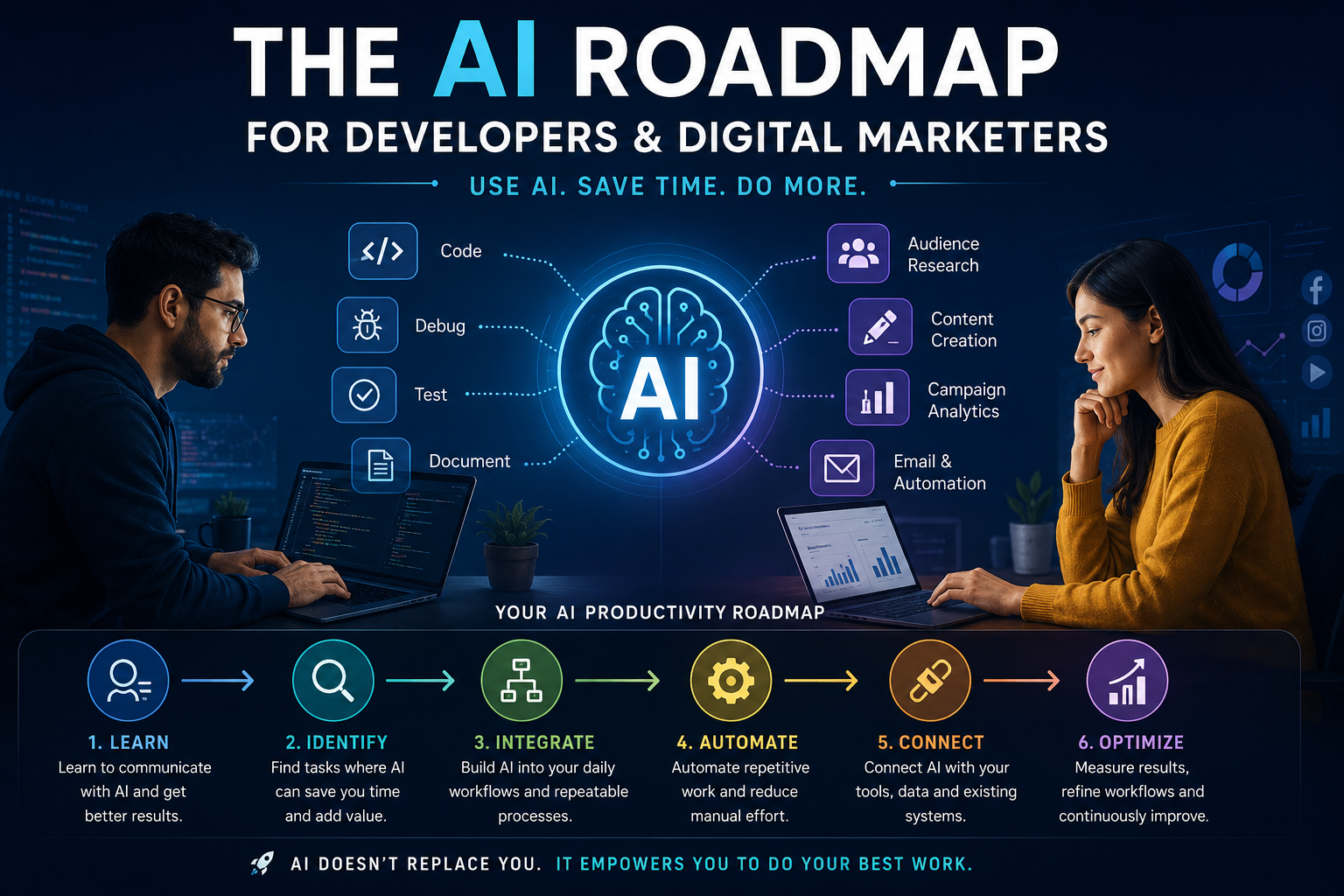
The AI Roadmap for Developers and Digital Marketers
Artificial Intelligence is no longer something professionals can simply sit and watch from the sidelines. For developers, AI is changing how applications are designed, coded, tested, debugged, documented, and maintained. For digital marketers, it is changing how we research audiences, create content, analyze campaigns, personalize communication, and automate repetitive tasks. But there is an important difference between using AI and working with AI effectively. Many professionals use AI occasionally—to write an email, generate a piece of code, create a social media post, or summarize something. Then they return to their traditional workflow. The real productivity gains begin when AI becomes part of the workflow itself.
This roadmap explains how developers and digital marketers can gradually move from being casual AI users to becoming AI-powered professionals.
Start With the Problem, Not the AI Tool
One of the biggest mistakes people make is starting their AI journey by asking:
“Which AI tool should I learn?”
There are hundreds of AI tools available today, and new ones appear almost every week. Trying to learn all of them is neither practical nor necessary. A better question is:
“Which parts of my work consume the most time and could be improved with AI?”
Look at your typical working day and identify tasks that involve research, writing, analysis, repetitive processing, documentation, coding, reporting, or data manipulation. Your objective should not be to use AI everywhere. Your objective should be to use AI where it creates measurable value.
Step 1: Learn to Communicate With AI
The first stage of the journey is becoming comfortable with AI tools. You don’t need to become a prompt-engineering expert. You simply need to learn how to give AI enough information to understand what you actually need. Compare these two requests:
Write a marketing email.
with:
I am a digital marketing consultant working with a SaaS company. We are launching a new feature for small businesses. Write an email for existing customers that encourages them to try the feature. Keep it professional but conversational, under 150 words, and include one clear call to action. The second request provides context, purpose, audience, constraints, and expected output. That difference can dramatically improve the result.
A useful way to structure your requests is:
Context → Objective → Information → Constraints → Expected Output
This approach works equally well for coding, marketing, research, analysis, and documentation.
Step 2: Perform an AI Audit of Your Work
Before introducing AI into your workflow, understand where your time is actually going. For a developer, a normal day might include requirement analysis, coding, debugging, SQL queries, testing, documentation, code reviews, production troubleshooting, and technical communication. A marketer might spend time researching keywords, analyzing competitors, preparing content, writing advertisements, managing campaigns, preparing reports, studying analytics, and communicating with clients.
Write down these activities and ask three questions:
- Does this require my personal expertise and judgment?
- Can AI help me perform it faster?
- Is this repetitive enough to eventually automate?
This simple exercise can reveal many opportunities. The first tasks you should target are generally those where AI can assist you without taking away the human decision-making involved.
Step 3: Bring AI Into the Developer Workflow
For developers, AI should be much more than a code generator. It can participate in almost every stage of the software development lifecycle.
Requirements
Before starting development, AI can help analyze requirements and identify missing information. Give it the requirement and ask it to identify ambiguous statements, missing edge cases, validation requirements, business rules, and questions that should be clarified. This can prevent problems before they reach the development stage.
Architecture
AI can also act as a technical discussion partner. For example, you can ask it to compare different architectural approaches based on scalability, maintainability, cost, complexity, deployment requirements, and team size. You should still make the final architectural decision. The value comes from using AI to explore possibilities and challenge your assumptions.
Coding
AI can accelerate many development tasks, including:
- Boilerplate code
- API implementations
- SQL queries
- Refactoring
- Regular expressions
- Unit tests
- Documentation
- Configuration
- Migration scripts
The goal should not be:
“Let AI write my application.”
A better approach is:
“Let AI accelerate my implementation while I remain responsible for design, security, quality, and correctness.”
Debugging
Debugging is another area where AI can be extremely useful. Instead of simply pasting an error and asking for a solution, provide the relevant code, error message, expected behavior, actual behavior, environment, and recent changes. Then ask AI to identify possible causes, rank them by likelihood, explain how to verify each one, and suggest the safest fix. This transforms AI from a simple answer generator into a debugging assistant.
Testing
AI can also help identify test scenarios that developers may overlook. Ask it to consider boundary conditions, invalid inputs, security scenarios, failure cases, concurrency issues, and regression scenarios. You can then review the suggestions and convert the relevant ones into automated tests.
Step 4: Bring AI Into the Marketing Workflow
The same principle applies to digital marketing. AI shouldn’t simply help marketers produce more content. It should help them research better, think faster, execute efficiently, and understand results more effectively.
Audience Research
AI can analyze customer reviews, product information, support conversations, surveys, and existing marketing material. It can help identify common customer problems, objections, desired outcomes, buying triggers, and the language customers naturally use. This information can then be used to create marketing messages that sound like they were written for real customers rather than generated for a generic audience.
Content Strategy
Instead of asking AI for 20 random blog ideas, provide information about your target audience, products, competitors, existing content, search intent, and business objectives. AI can then help identify content opportunities across the customer journey:
Awareness → Consideration → Evaluation → Conversion → Retention
This produces a much more useful content strategy than simply generating a list of topics.
SEO
AI can assist with many SEO activities, including keyword clustering, search-intent analysis, content briefs, competitor research, internal-linking opportunities, content gaps, title ideas, and content updates.But AI-generated content should never automatically become published content. A human still needs to check accuracy, originality, search intent, expertise, and business relevance.
Advertising
AI can quickly generate variations of headlines, primary text, calls to action, landing-page copy, and creative concepts. However, successful advertising still depends on real-world testing. A strong workflow is:
Human strategy → AI variations → Human selection → Campaign testing → Performance data → AI-assisted analysis → Human decision
AI accelerates the process, but actual customer behavior remains the final judge.
Step 5: Start Using Your Own Data
This is where AI becomes much more powerful. Generic questions produce generic answers. When AI has access to relevant business information, its usefulness increases considerably. For developers, this could include project documentation, API specifications, coding standards, architecture decisions, logs, known issues, and technical documentation. For marketers, it could include brand guidelines, customer research, campaign reports, product information, analytics, customer reviews, and previous content.
Instead of asking AI:
“How should I market this product?”
you can give it your actual product information, customer research, previous campaigns, and performance data. Now AI can work within the context of your business.
Step 6: Turn Successful Prompts into Workflows
Once you discover a task where AI consistently helps, don’t keep starting from scratch. Turn it into a repeatable workflow. For example, a developer could create a process such as:
Production Error → AI Analysis → Possible Causes → Investigation Steps → Recommended Fix → Test Cases → Documentation
A marketer could create:
Customer Research → Positioning → Content Strategy → Content Brief → Draft → SEO Review → Social Content → Email → Performance Analysis
The important transition here is from AI conversations to AI-assisted processes. You’re no longer simply asking AI questions. You’re building a repeatable way of working.
Step 7: Connect AI With Your Existing Tools
The next level is connecting AI to the tools you already use. A developer may work across source control, project management, databases, CI/CD pipelines, monitoring systems, and documentation. A marketer may work with CRM systems, analytics platforms, advertising platforms, email marketing systems, content management systems, and social media tools. AI can potentially become the layer that connects these systems. This can involve APIs, webhooks, automation platforms, AI APIs, custom applications, and workflow automation. The goal isn’t to automate everything. The goal is to remove unnecessary manual handoffs.
Step 8: Build Your Own AI Assistant
At some point, you can move beyond using AI as a general-purpose chatbot. You can start creating an assistant that understands your specific working environment. For a developer, an AI assistant could understand project architecture, coding conventions, documentation, common modules, deployment processes, and known issues. For a marketer, it could understand the company’s products, target audience, brand voice, campaign history, SEO strategy, and content standards. This is where concepts such as RAG (Retrieval-Augmented Generation), AI agents, tool calling, and AI APIs become useful. You don’t need to learn all of these technologies immediately. Learn them when your workflow has reached the point where they solve a real problem.
Step 9: Automate Repetitive Work
Once you’ve identified repetitive workflows, ask a simple question:
“Can this happen automatically?”
Consider a developer dealing with production errors. Instead of manually reading every error, an automated workflow could capture the error, provide relevant logs to an AI system, analyze possible causes, and create a structured diagnostic report. The developer then reviews the information and decides what to do. The same principle applies to marketing. A weekly campaign report could be generated automatically, with AI identifying significant changes, summarizing performance, and highlighting areas that deserve attention. The marketer still reviews the recommendations. The difference is that hours of manual preparation have been removed. This is the right model for AI automation:
AI prepares. Humans decide.
Step 10: Learn to Verify AI’s Work
As your dependence on AI increases, verification becomes even more important. AI can produce answers that look convincing but are wrong. It can misunderstand requirements, invent information, generate insecure code, make incorrect assumptions, or misinterpret data. Therefore, becoming AI-powered doesn’t mean becoming AI-dependent. For developers, verification means running the code, executing tests, checking security implications, reviewing database impact, and evaluating performance.
For marketers, it means checking facts, validating statistics, reviewing campaign data, verifying claims, and ensuring that the messaging actually aligns with the brand and audience. A good AI professional doesn’t simply ask:
“What is the answer?”
They also ask:
“How can I verify the answer?”
Your 30-60-90 Day AI Roadmap
You don’t need to transform your entire workflow overnight. A gradual approach is much more effective.
First 30 Days: Become an AI Power User
Focus on using AI every working day.
Experiment with:
- Research
- Summarization
- Brainstorming
- Writing
- Coding
- Data analysis
- Documentation
- Problem solving
The objective is to understand where AI genuinely helps you.
Days 31–60: Build Repeatable Workflows
Now identify the five to ten tasks you perform repeatedly. Start creating standard prompts, templates, checklists, and workflows around those tasks. Your goal is to stop asking:
“How can AI help me today?”
and start thinking:
“Which part of my existing workflow should AI handle?”
Days 61–90: Start Automating
Once your workflows are stable, start connecting AI with your existing tools. Explore concepts such as:
- APIs
- Webhooks
- Automation
- Structured outputs
- AI integrations
- RAG
- AI agents
- Workflow orchestration
You don’t have to become an AI engineer. You simply need enough understanding to recognize where automation can remove repetitive work.
Don’t Try to Learn Every AI Tool
This deserves special attention. The AI landscape changes incredibly quickly. A tool that is popular today may be replaced by something better tomorrow. Therefore, don’t build your AI strategy around a specific list of tools. Build it around skills and workflows. The tools will change. The ability to define a problem, provide context, collaborate with AI, verify results, automate processes, and measure outcomes will remain valuable.
Measure Productivity, Not the Number of Prompts
Using AI more doesn’t necessarily mean becoming more productive. Sending 100 prompts a day is not an achievement if they don’t save time or improve your work. Instead, measure outcomes. If a task previously took three days and your improved AI-assisted workflow brings it down to one and a half days, that’s meaningful. If preparing a weekly marketing report previously took four hours and automation reduces it to 45 minutes, that’s meaningful too. The real question is not:
“How much AI am I using?”
It is:
“How much valuable time is AI giving back to me?”
The Most Important AI Skill: Knowing What Not to Automate
AI can assist with an enormous range of tasks, but not everything should be automated. Human judgment remains particularly important for decisions involving:
- Business strategy
- Software architecture
- Security
- Client relationships
- Brand positioning
- Hiring
- Legal and compliance matters
- Sensitive communications
- High-impact financial decisions
AI should increase your capabilities, not remove your responsibility.
The AI Productivity Flywheel
The long-term goal is to create a continuous improvement cycle.
Identify repetitive work
↓
Use AI to assist
↓
Measure the result
↓
Improve the workflow
↓
Automate repetitive parts
↓
Connect AI with your existing tools
↓
Review the outcome
↓
Improve again
This creates an AI productivity flywheel. Over time, you’re not just using AI more. You’re building a better way of working.
From AI User to AI-Powered Professional
The future isn’t simply about developers who know AI or marketers who know AI. It will increasingly belong to professionals who know how to combine their domain expertise with AI. A developer who understands software architecture, databases, security, and business requirements—and knows how to use AI effectively—can potentially accomplish significantly more in the same amount of time.
A marketer who understands customers, positioning, SEO, advertising, analytics, and business objectives—and knows how to use AI for research, creation, analysis, and automation—can do the same. So don’t begin your AI journey by asking:
“Which AI tool should I learn?”
Start with a better question:
“What work am I doing repeatedly that AI could help me do better, faster, or more intelligently?”
Find one task. Improve it. Measure the result. Then move to the next one. That’s how you move from being an AI user to an AI-assisted professional, and eventually to an AI-powered expert. You can write to us at: info@iedgesoft.com to learn more.